Quick Photo & File Recovery
- 4.4
- Rating
- 100.00K
- Installs
- Free
- Price

 Analysis by App-foxy
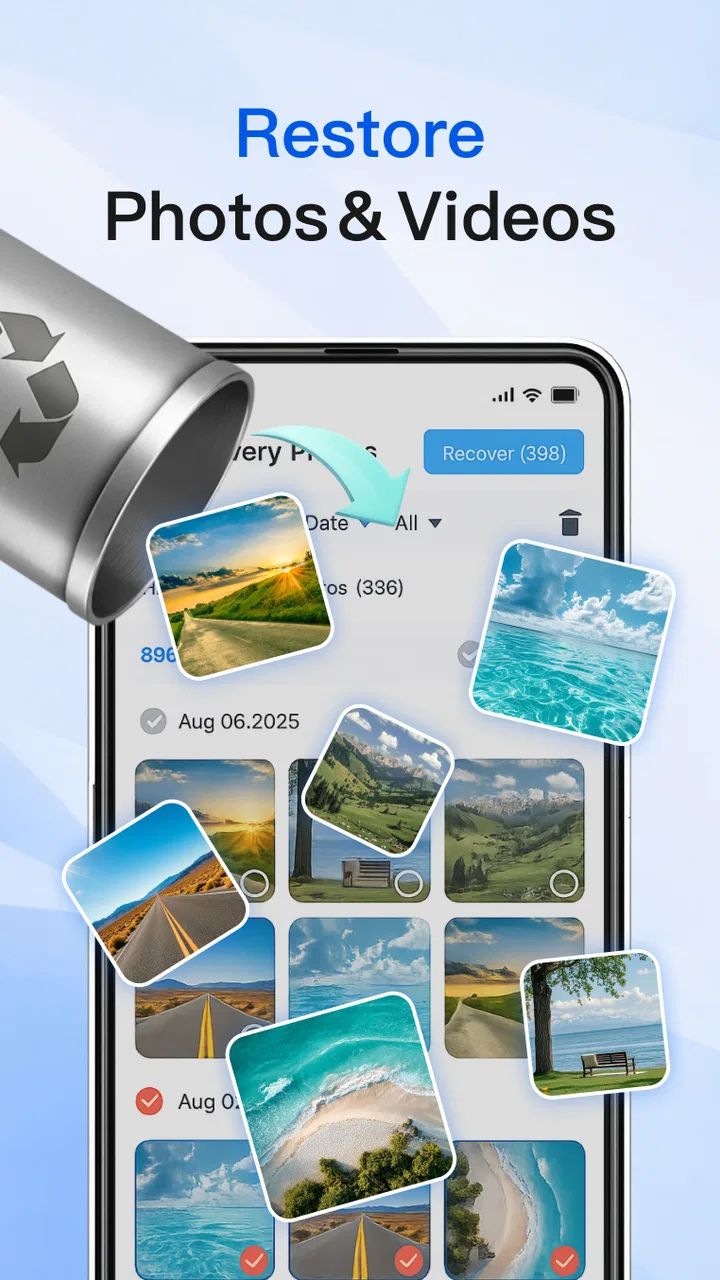
I look at Quick Photo & File Recovery as a practical first attempt when an important picture, video, or document disappears from a phone. Its appeal is easy to understand: it focuses on recovering local files rather than turning the process into a complicated maintenance project. In my experience, that makes it approachable for someone who wants to scan a device, review what can be found, and decide what is worth restoring. It is a free tools app from 深圳优蕴秀科技有限公司, with an Everyone age rating, so its basic audience is broad.
My overall view is positive but measured. The app is most useful when the deletion was recent and the storage area has not been heavily reused. It is not a magic undo button, and I would not treat it as a substitute for a backup routine. The strongest reason to try it is convenience: it gives ordinary Android users a focused recovery workflow instead of asking them to understand file systems or search through folders manually.
What the recovery experience gets right
The first thing I appreciate is the narrow purpose. Many phone tools bundle cleaning, boosting, security checks, and storage analysis into one crowded interface. Quick Photo & File Recovery keeps the central task in view: look for recoverable photos, videos, and files stored on the device. That focus matters when the user is already stressed because a family picture, work attachment, or downloaded document has vanished.
You May Also Like

 Blood Strike: 2.5 Anniversary
Blood Strike’s Loadouts Turn Every Drop Into a Tactical Gamble
A close look at Blood Strike’s custom loadouts: how fast access to signature weapons reshapes its battle royale rhythm, rewards preparation, and narrows the gap between fights.

 Pandora - Music & Podcasts
Pandora’s Music Is Easy to Start, but Harder to Recover
Pandora’s strength is its low-effort path from a seed to a station. Its weak spot is how much confidence it asks you to place in connection, setup, and quiet recovery.

 8 Ball Pool
 Is Built on Rivalries, Rematches, and Routine
A close look at the rivalries, rematches, shared routines, and unanswered safety questions that turn a quick pool match into a persistent mobile community.

 Samsung Music
’s Quiet Strength Is Playing What You Already Own
Its reach comes less from spectacle than from dependable access to a personal library. That simplicity is both the app’s strongest retention engine and its ceiling.

 AccuWeather: Weather Radar
AccuWeather Review: A Quick, Clear Forecast for Everyday Decisions
For everyday plans, the best forecast is the one you can understand quickly. AccuWeather makes rain timing, radar, and local conditions easy to act on, with a few trade-offs.

 Hill Climb Racing
Why Hill Climb Racing Still Turns Crashes Into One More Run
A tiny car, a bumpy hill and one more upgrade: Hill Climb Racing keeps resurfacing because its simple chaos makes every near-miss feel personal.
More From Our News Desk



The app is listed under Tools, and that is a better description than calling it a general file manager. A file manager helps me browse and organize items that still exist in visible folders. A recovery tool has a different job: it searches for remnants or overlooked copies and presents possible results for inspection. Understanding that distinction prevents a common mistake. If I simply moved a file into another folder, a file manager may be the faster answer; if I deleted it and cannot locate it, a recovery scan is more appropriate.
In a realistic everyday situation, imagine deleting several images while clearing space before a trip, then realizing that one of them was a receipt or an address needed later. I would stop downloading new media, avoid recording more videos, and open the recovery app as soon as possible. The reason is practical rather than mysterious: new files can occupy storage areas that previously held deleted content. A recovery attempt is therefore more promising before the phone has had time to fill those areas again.
My preferred workflow is to scan first, inspect results carefully, and restore only the files I genuinely need. That selective approach is better than recovering everything indiscriminately. It reduces clutter and makes it easier to notice whether the recovered item is complete, recognizable, and actually the right file. The app’s value is not just finding candidates; it is helping me turn a stressful search into a short review process.
The most important habit is to stop using the affected storage before scanning. Avoiding new photographs, large downloads, app installations, and offline video saves gives a recovery tool a better chance of finding useful remnants. This is the kind of practical step a short store summary will not tell you, yet it can matter more than repeatedly scanning after the phone has continued writing data.
Why local recovery is useful, and where it stops
Because the app is aimed at local device storage, I see it as an immediate-response tool. It can be handy when I do not remember the original folder, when a gallery view no longer shows the item, or when I want one place to search across supported local media and files. That is more convenient than manually checking camera folders, messaging folders, downloads, and application-specific directories one by one.
There is also a useful distinction between a missing file and a damaged file. If the item is present but will not open, recovery may not repair its contents. If the item was deleted but portions remain accessible to a scan, the situation is different. I would use the app to investigate disappearance, not assume that it can reconstruct every corrupted video or unreadable document.
Results should be treated as candidates rather than guaranteed originals. A scan may surface similarly named items, thumbnails, partial media, or files that look familiar but are not the version I wanted. I would compare image content, file type, and visible quality before restoring. For important documents, I would open the recovered copy immediately and confirm that the pages or text are intact rather than trusting the filename alone.
Another useful tactic is to restore recovered items to a different location when the app allows a choice. Keeping the output separate from the area being scanned makes it easier to compare results and avoids confusing a newly restored copy with an older damaged one. It also gives me a cleaner way to test whether a video plays or whether a document opens correctly.
The main weakness: recovery depends on the storage situation
The biggest limitation is not unique to this app, but it is important enough to shape my recommendation. A recovery application cannot promise success after deleted storage has been overwritten, and modern phone storage can make deep recovery difficult. In other words, installing Quick Photo & File Recovery after a long period of normal phone use may produce less useful results than opening it immediately after the mistake.
This also means that a successful scan does not necessarily equal a successful restoration. Some results may be incomplete, low quality, or missing their original organization. A recovered photo without its familiar album context can still be valuable, but recovering dozens of loosely named files may take time. I would rather see the tool as a chance to rescue selected items than as a guaranteed way to rebuild an entire gallery.
There is a second kind of friction: expectations. The short description, “Quick Recovery,” sets an appealing tone, but quick does not mean universal. The scan still has to examine storage, and the usefulness of the result depends on what remains available. I would not judge the app unfairly because it cannot recover a file that the phone has already overwritten. I would, however, judge it by how clearly it helps me distinguish promising results from weak ones.
For files that were synchronized to a cloud service, sent through a messaging app, or copied to a computer, I would check those alternatives before relying on local recovery. The original may still be available in a recycle area, conversation attachment, desktop folder, or backup. Those sources can preserve the intact file and its original name, album, or date more reliably than a local scan. Quick Photo & File Recovery is most sensible when those usual places do not help or when I need a fast local search.
How it compares with the usual alternatives
Compared with a phone’s gallery trash or recently deleted folder, this app is more of a second step. The built-in trash is usually easier because it preserves recognizable previews and lets me restore an item with its normal organization. I would always check that first. Quick Photo & File Recovery becomes more interesting when the item is no longer visible there or when I need to search beyond the gallery’s normal view.
Compared with a cloud backup, local recovery is less dependable as a long-term safety net but more immediate when I have no usable backup. A backup is the better protection before deletion happens; this app is the emergency option afterward. That difference is central to using it responsibly. I would not replace automatic backups with a recovery utility, especially for irreplaceable photographs or work files.
Compared with a desktop recovery program, the Android app is more convenient because I can start on the phone without connecting another device. A computer-based approach may be preferable for advanced cases, larger storage investigations, or situations where I need more detailed control. The trade-off is simplicity versus depth. For a casual user with one missing photo, the phone-first route is reasonable. For a professional recovery job, I would look beyond a lightweight mobile tool.
Compared with a generic cleaner, this app has a clearer purpose. Cleaners are designed to remove unnecessary content, while recovery software is used after something has gone missing. I would avoid running an aggressive cleaning process before attempting recovery, because deleting caches or temporary material may remove clues that a scan could otherwise identify. This is an easy mistake when someone sees a storage problem and immediately reaches for a cleanup button.
Small decisions that improve the chance of a useful result
My first recommendation is to identify the type of loss before starting. If only one photograph is missing, a focused search and careful preview are preferable to restoring every result. If several documents disappeared from a download folder, I would note their approximate formats and names before scanning, then use that information to separate relevant candidates from unrelated media.
My second recommendation is to preserve the phone’s current state. I would turn off automatic media downloads temporarily, avoid social media scrolling that saves cached content, and postpone system-heavy tasks. I would also avoid repeatedly uninstalling and reinstalling recovery software. Each additional storage operation can complicate the situation, while repeated scans do not create data that has already been overwritten.
My third recommendation is to verify the recovered file outside the preview list. A thumbnail can look correct while the underlying video is incomplete, and a document can appear in search results while failing to open properly. I would play a restored video from beginning to end when it matters, inspect several pages of a document, and compare a photo at full size. This extra check prevents false confidence.
A fourth practical insight is to separate recovery from organization. First rescue the files into a safe, clearly named location; only afterward should I sort them into albums or rename them. Trying to reorganize during the recovery process makes it harder to tell which copies are original, partial, or newly restored. It also reduces the chance of accidentally deleting a result that has not yet been checked.
Who should use it, and who should choose another route
I think Quick Photo & File Recovery is a good fit for Android users who deleted local media by mistake, cannot find a file through normal browsing, or want a straightforward first response before considering more technical options. It is especially approachable for people who do not want to connect a phone to a computer or learn specialist recovery software. The free price makes trying that first step less of a commitment.
It is also useful for someone who regularly handles mixed content. A phone may contain camera images, short clips, downloaded PDFs, and miscellaneous files spread across different folders. A recovery-focused tool can save time by giving that search a single starting point. I would still keep expectations realistic and judge the result item by item.
I would skip it as a primary solution if the missing content is already safely stored in a cloud backup or a gallery trash folder. Those routes are usually cleaner and preserve more context. I would also look for a desktop specialist when the data is business-critical, the storage has been heavily used since deletion, or the phone has suffered physical damage. In those cases, experimenting on the device may not be the safest choice.
Privacy-conscious users should also think about the sensitivity of what they are trying to recover. A tool that searches local media may surface private photographs or documents alongside the target. I would review results in a private setting, restore only what is necessary, and remove unwanted recovered copies afterward. That is not a reason to reject the app, but it is a sensible part of using any recovery utility responsibly.
Version, accessibility, and overall value
The current version is 1.1.2, and the app supports Android devices running version 8.0 or later. That makes compatibility fairly approachable for users with older supported phones, while still keeping the experience within a modern Android environment. Before depending on it during an emergency, I would install it while the phone is working normally and become familiar with the scan and result-review flow.
Its public reception is encouraging without making the app beyond criticism: it has a 4.4 average from around 970 ratings, with 29 written reviews, and has passed 100K installs. I read those figures as signs that people are finding a use for it, not as proof that every recovery attempt will succeed. Recovery outcomes vary too much with the storage history and the type of deletion for a rating alone to settle the question.
The developer, 深圳优蕴秀科技有限公司, presents the product as a focused utility rather than an entertainment app or a broad phone-management suite. That narrow identity works in its favor. I would rather use a tool that concentrates on the missing photos, videos, and files in front of me than navigate a long list of unrelated features when time matters.
Still, I would keep a backup habit alongside it. Once I recover something important, I would copy it to another safe location and avoid treating the restored file as the only remaining version. The best use of this app is as a rescue layer in a larger storage routine, not as permission to ignore backups or keep deleting without checking.
My final recommendation
After weighing the convenience against the limits of local recovery, I would recommend Quick Photo & File Recovery as a sensible first try for accidental deletion on a compatible Android phone. It is free, focused, and easier to approach than many technical alternatives. The strongest results are likely to come when I act quickly, stop writing new data, inspect candidates carefully, and verify every restored file.
Quick Photo & File Recovery is best understood as an emergency search tool, not a guarantee. That distinction captures my honest opinion. If a missing item is still in a built-in trash folder or backup, I would use that source first. If it has disappeared from those places, this app offers a convenient next step. For ordinary users with a recent local deletion, I think it is worth having available; for severe, overwritten, or professionally important cases, I would move to a more specialized recovery strategy.
In short, I would recommend it to a friend who needs a practical chance to recover a lost photo, video, or file without immediately reaching for a computer. I would also tell that friend to act quickly, keep the recovered copies separate, and create a backup once the crisis is over. Used with those expectations, the app earns its place among useful Android tools.
FAQs for Quick Photo & File Recovery
01What types of files can Quick Photo & File Recovery restore?
Quick Photo & File Recovery is capable of restoring a variety of file types, including photos, videos, documents, and audio files. It supports common formats like JPEG, PNG, MP4, DOC, and MP3, making it a versatile tool for recovering lost or accidentally deleted files from your device.
02Is Quick Photo & File Recovery compatible with all Android and iOS devices?
Quick Photo & File Recovery is designed to work on a wide range of Android and iOS devices. However, specific compatibility may depend on your device's operating system version and hardware capabilities. It's recommended to check the app's requirements on the download page to ensure it will function optimally on your device.
03Does Quick Photo & File Recovery require root access on Android devices?
No, Quick Photo & File Recovery does not require root access to function. It is designed to work on both rooted and unrooted Android devices, providing flexibility and ease of use for users who prefer not to modify their device's operating system.
04How secure is the data recovery process with Quick Photo & File Recovery?
The app prioritizes user privacy and data security. It does not store or share your recovered files with third parties. All recovery processes are conducted locally on your device, ensuring that your personal data remains private and secure throughout the recovery process.
05What should I do if Quick Photo & File Recovery fails to recover my files?
If the app fails to recover your files, ensure that you follow the provided instructions carefully, as incorrect usage may affect recovery success. Additionally, check for app updates or reach out to customer support for assistance. Recovery success can vary based on the condition and time since file deletion.
Pros
- Easy-to-use interface for quick recovery.
- Supports a wide range of file types.
- Fast scanning and recovery process.
- Includes preview option before recovery.
- Works without needing root access.
Cons
- Limited free version features.
- Occasional false positives in scans.
- May not recover all file types.
- Ads can be intrusive at times.
- No cloud backup integration.

Quick Photo & File Recovery
Gallery